> ## Documentation Index
> Fetch the complete documentation index at: https://api-portal.etoro.com/llms.txt
> Use this file to discover all available pages before exploring further.

# Authentication

> How to authenticate to the eToro API

Access to the API requires two specific keys to ensure secure interaction between the application and the user account.

* **Public API Key**: Identifies the application.
* **User Key**: Identifies your user account.

## How to get the keys

To access your own account data, you must generate a user-specific key through the eToro platform. Please follow these steps:

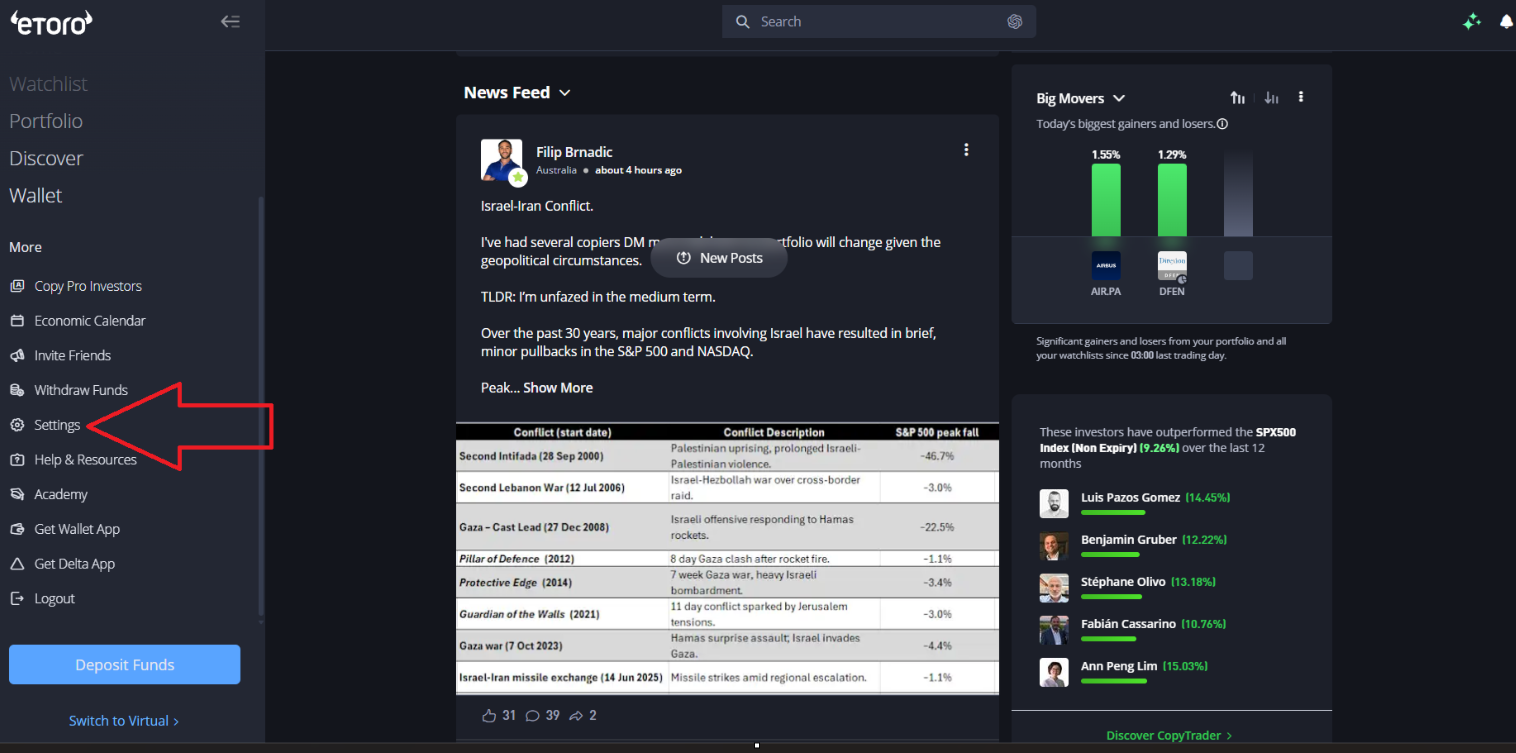
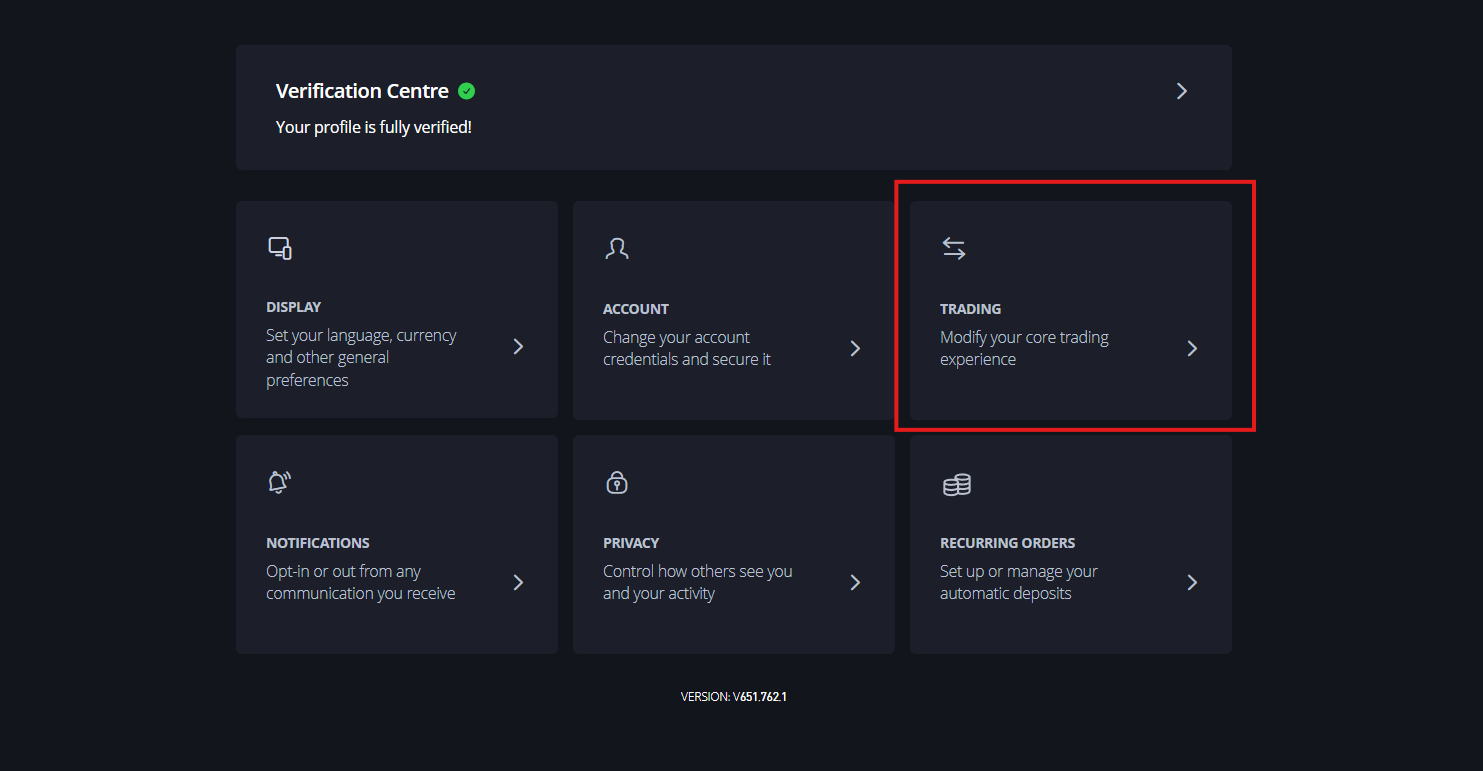
### 1. Navigate to Settings > Trading

Log in to your eToro account. In the sidebar menu, click on **Settings**. From the settings menu, select the **Trading** option.
<img src="https://mintcdn.com/etoro-6fc30280/g0Mti1rBGaHVyfWd/images/api-reference/authentication-1.png?fit=max&auto=format&n=g0Mti1rBGaHVyfWd&q=85&s=db514689f5770342dd3877108ea79655" alt="Settings > Trading" data-og-width="1516" width="1516" data-og-height="753" height="753" data-path="images/api-reference/authentication-1.png" data-optimize="true" data-opv="3" srcset="https://mintcdn.com/etoro-6fc30280/g0Mti1rBGaHVyfWd/images/api-reference/authentication-1.png?w=280&fit=max&auto=format&n=g0Mti1rBGaHVyfWd&q=85&s=6c6b0248139fd48f72ca9d442206b099 280w, https://mintcdn.com/etoro-6fc30280/g0Mti1rBGaHVyfWd/images/api-reference/authentication-1.png?w=560&fit=max&auto=format&n=g0Mti1rBGaHVyfWd&q=85&s=562f08d4debb49477dd13958890a3373 560w, https://mintcdn.com/etoro-6fc30280/g0Mti1rBGaHVyfWd/images/api-reference/authentication-1.png?w=840&fit=max&auto=format&n=g0Mti1rBGaHVyfWd&q=85&s=919826a5e6c2ec986ee87d44a49b18a3 840w, https://mintcdn.com/etoro-6fc30280/g0Mti1rBGaHVyfWd/images/api-reference/authentication-1.png?w=1100&fit=max&auto=format&n=g0Mti1rBGaHVyfWd&q=85&s=5b0a649b9ea7bbaad21765e11ccf61d4 1100w, https://mintcdn.com/etoro-6fc30280/g0Mti1rBGaHVyfWd/images/api-reference/authentication-1.png?w=1650&fit=max&auto=format&n=g0Mti1rBGaHVyfWd&q=85&s=b8fec7890e525c705522b4fac8a2b1a1 1650w, https://mintcdn.com/etoro-6fc30280/g0Mti1rBGaHVyfWd/images/api-reference/authentication-1.png?w=2500&fit=max&auto=format&n=g0Mti1rBGaHVyfWd&q=85&s=44ce8e921903061d154a2b033c128dcb 2500w" />

<img src="https://mintcdn.com/etoro-6fc30280/g0Mti1rBGaHVyfWd/images/api-reference/authentication-2.png?fit=max&auto=format&n=g0Mti1rBGaHVyfWd&q=85&s=5b9b22599e5ef61f280106303be41263" alt="Trading > API Key Management" data-og-width="1483" width="1483" data-og-height="771" height="771" data-path="images/api-reference/authentication-2.png" data-optimize="true" data-opv="3" srcset="https://mintcdn.com/etoro-6fc30280/g0Mti1rBGaHVyfWd/images/api-reference/authentication-2.png?w=280&fit=max&auto=format&n=g0Mti1rBGaHVyfWd&q=85&s=f9782aaa7fa95538ff47bde317d8a2d1 280w, https://mintcdn.com/etoro-6fc30280/g0Mti1rBGaHVyfWd/images/api-reference/authentication-2.png?w=560&fit=max&auto=format&n=g0Mti1rBGaHVyfWd&q=85&s=13ac2647bef9a7f80d34934c4ab1951c 560w, https://mintcdn.com/etoro-6fc30280/g0Mti1rBGaHVyfWd/images/api-reference/authentication-2.png?w=840&fit=max&auto=format&n=g0Mti1rBGaHVyfWd&q=85&s=ceecc069ad0485bd70a4e6b71a0e901b 840w, https://mintcdn.com/etoro-6fc30280/g0Mti1rBGaHVyfWd/images/api-reference/authentication-2.png?w=1100&fit=max&auto=format&n=g0Mti1rBGaHVyfWd&q=85&s=49c25e0e32023efd528aa18d3722b817 1100w, https://mintcdn.com/etoro-6fc30280/g0Mti1rBGaHVyfWd/images/api-reference/authentication-2.png?w=1650&fit=max&auto=format&n=g0Mti1rBGaHVyfWd&q=85&s=fbf06fb9a5db9c0cd6257b555ffcfc17 1650w, https://mintcdn.com/etoro-6fc30280/g0Mti1rBGaHVyfWd/images/api-reference/authentication-2.png?w=2500&fit=max&auto=format&n=g0Mti1rBGaHVyfWd&q=85&s=0f6d5da5e21a41a42118c83099a11175 2500w" />

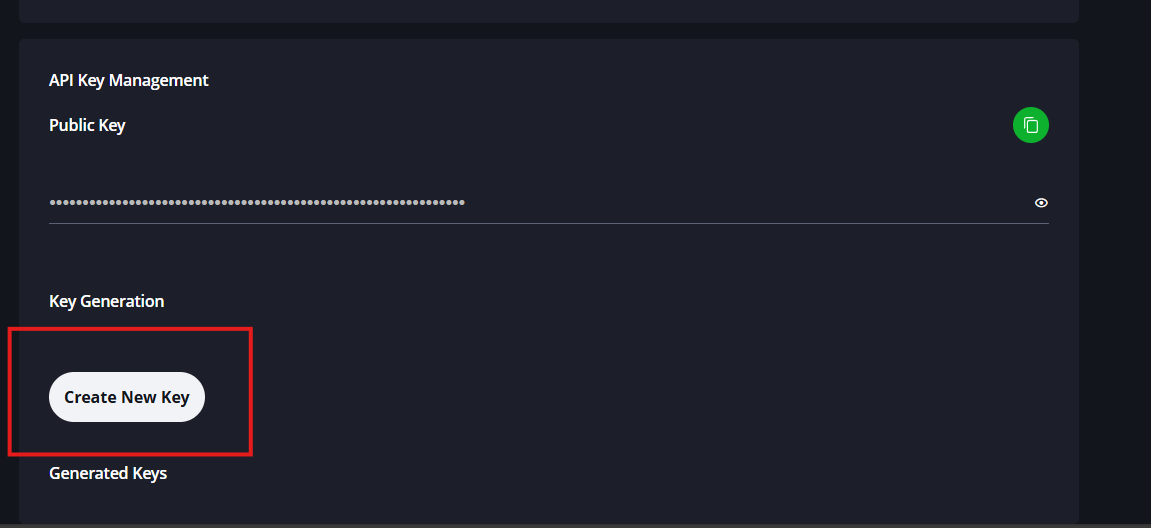
### 2. Create a New Key

Scroll to the "API Key Management" section and click the **Create New Key** button.
<img src="https://mintcdn.com/etoro-6fc30280/g0Mti1rBGaHVyfWd/images/api-reference/authentication-3.png?fit=max&auto=format&n=g0Mti1rBGaHVyfWd&q=85&s=d740a3764f43cc534fa79d88b9a2f91e" alt="API Key Management > Create New Key" data-og-width="1151" width="1151" data-og-height="528" height="528" data-path="images/api-reference/authentication-3.png" data-optimize="true" data-opv="3" srcset="https://mintcdn.com/etoro-6fc30280/g0Mti1rBGaHVyfWd/images/api-reference/authentication-3.png?w=280&fit=max&auto=format&n=g0Mti1rBGaHVyfWd&q=85&s=396f17243b7bb0ed4c8c4e72f4eabb6f 280w, https://mintcdn.com/etoro-6fc30280/g0Mti1rBGaHVyfWd/images/api-reference/authentication-3.png?w=560&fit=max&auto=format&n=g0Mti1rBGaHVyfWd&q=85&s=e1b8638b702eb01e0e39b4dda4b247b2 560w, https://mintcdn.com/etoro-6fc30280/g0Mti1rBGaHVyfWd/images/api-reference/authentication-3.png?w=840&fit=max&auto=format&n=g0Mti1rBGaHVyfWd&q=85&s=c1dfd4b6619aa2efa9230c837c88626a 840w, https://mintcdn.com/etoro-6fc30280/g0Mti1rBGaHVyfWd/images/api-reference/authentication-3.png?w=1100&fit=max&auto=format&n=g0Mti1rBGaHVyfWd&q=85&s=759b7f77e4021692064121e36dfc8160 1100w, https://mintcdn.com/etoro-6fc30280/g0Mti1rBGaHVyfWd/images/api-reference/authentication-3.png?w=1650&fit=max&auto=format&n=g0Mti1rBGaHVyfWd&q=85&s=ba82cddb5452d18a6b1cf568f8e45e24 1650w, https://mintcdn.com/etoro-6fc30280/g0Mti1rBGaHVyfWd/images/api-reference/authentication-3.png?w=2500&fit=max&auto=format&n=g0Mti1rBGaHVyfWd&q=85&s=9f97c0d0353195f4aea182078595ceb0 2500w" />

### 3. Configure Key Permissions

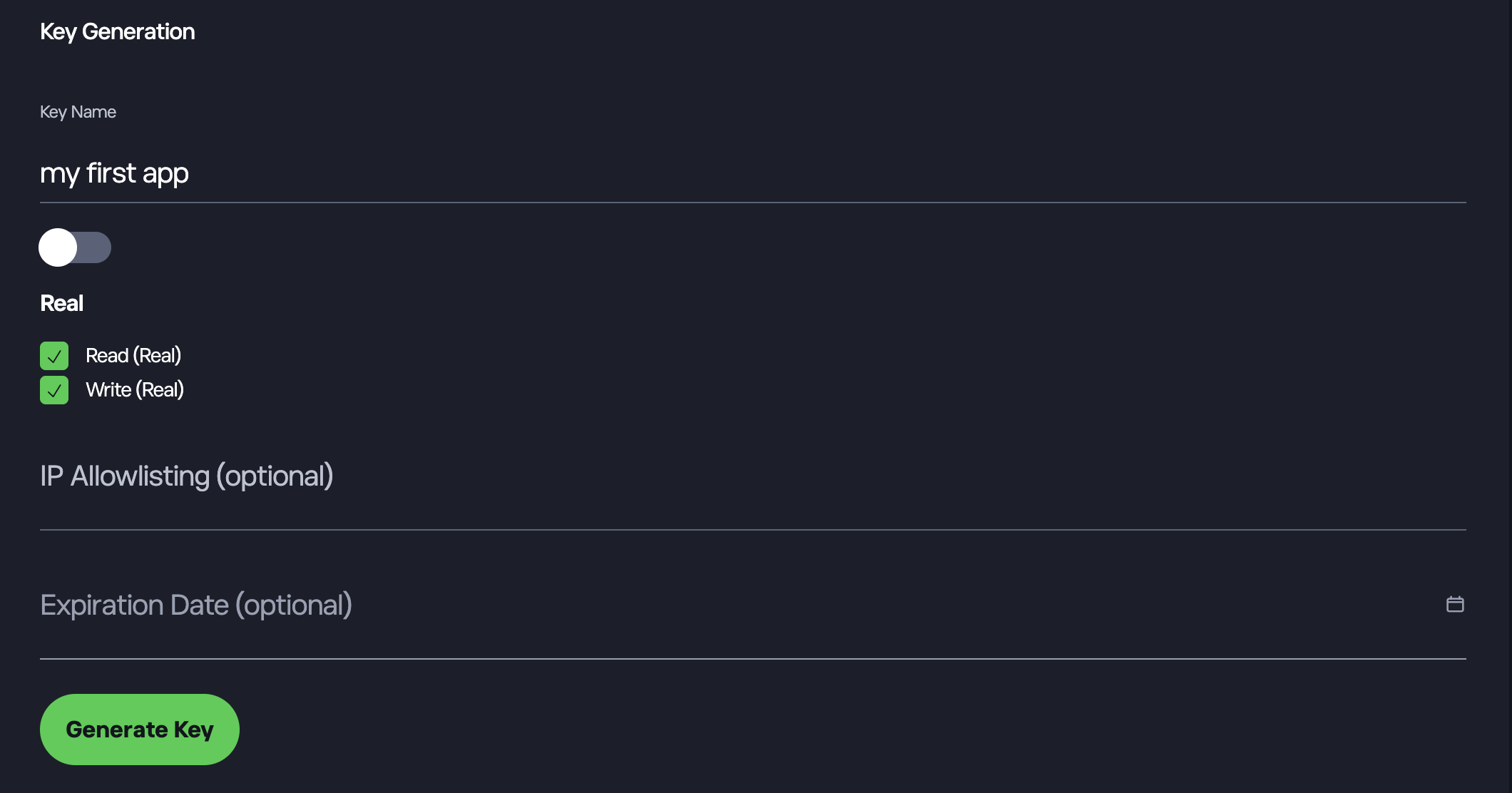
A "Key Generation" modal will appear. Complete the following fields:

* **Key Name:** Enter any name you wish to identify this key.

* **Environment:** Select either "Demo" or "Real". Each key can only be used for one environment. If you need to use both, please create two keys.

* **Permissions:** Select "Read" if you only need to access your portfolio data. Select "Write" if you need to execute trades.

* **Security:** You may optionally configure an "IPS Whitelist" or set an "Expiration Date".

Click **Generate Key** to proceed.
<img src="https://mintcdn.com/etoro-6fc30280/fF50SDJhiG_GpAWR/images/api-reference/authentication-4.png?fit=max&auto=format&n=fF50SDJhiG_GpAWR&q=85&s=3506dae12d559629282130eb18d80320" alt="API Key Management > Generate Key" data-og-width="2120" width="2120" data-og-height="1112" height="1112" data-path="images/api-reference/authentication-4.png" data-optimize="true" data-opv="3" srcset="https://mintcdn.com/etoro-6fc30280/fF50SDJhiG_GpAWR/images/api-reference/authentication-4.png?w=280&fit=max&auto=format&n=fF50SDJhiG_GpAWR&q=85&s=844158b6c1125546d3bef3c48aee1d95 280w, https://mintcdn.com/etoro-6fc30280/fF50SDJhiG_GpAWR/images/api-reference/authentication-4.png?w=560&fit=max&auto=format&n=fF50SDJhiG_GpAWR&q=85&s=6826f3697044fc2e7fab86a546bf9a14 560w, https://mintcdn.com/etoro-6fc30280/fF50SDJhiG_GpAWR/images/api-reference/authentication-4.png?w=840&fit=max&auto=format&n=fF50SDJhiG_GpAWR&q=85&s=8681083f7d27763c50ac2055b22e9d09 840w, https://mintcdn.com/etoro-6fc30280/fF50SDJhiG_GpAWR/images/api-reference/authentication-4.png?w=1100&fit=max&auto=format&n=fF50SDJhiG_GpAWR&q=85&s=017d2a78d6759b6d2f0a5d06b84be76c 1100w, https://mintcdn.com/etoro-6fc30280/fF50SDJhiG_GpAWR/images/api-reference/authentication-4.png?w=1650&fit=max&auto=format&n=fF50SDJhiG_GpAWR&q=85&s=121a037b884c39ec56b7e5787ab635ee 1650w, https://mintcdn.com/etoro-6fc30280/fF50SDJhiG_GpAWR/images/api-reference/authentication-4.png?w=2500&fit=max&auto=format&n=fF50SDJhiG_GpAWR&q=85&s=b3017cee4397ebd5132ae415efe73257 2500w" />

### 4. Verify Identity

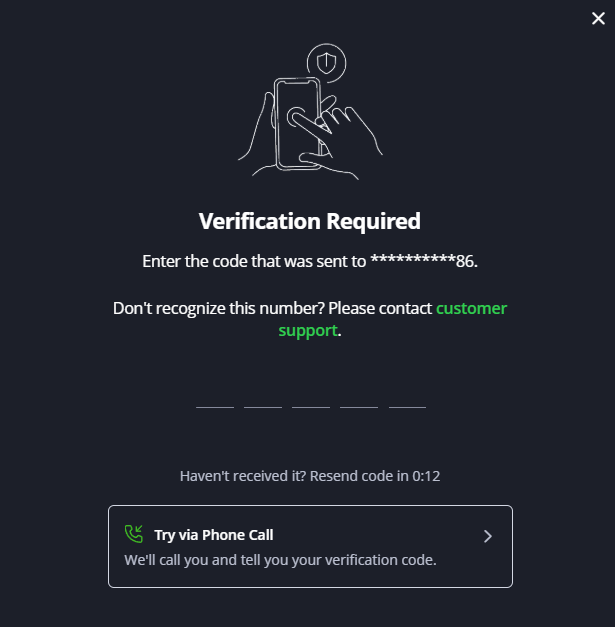
For security, you will be prompted to enter a verification code sent to your mobile device.

> **Tip:** If you do not receive the SMS code after approximately 10 seconds, use the "Try via Phone Call" option.
<img src="https://mintcdn.com/etoro-6fc30280/g0Mti1rBGaHVyfWd/images/api-reference/authentication-5.png?fit=max&auto=format&n=g0Mti1rBGaHVyfWd&q=85&s=164b6c3a909ec0d7e0641750bfe1ca83" alt="API Key Management > Verify Identity" data-og-width="615" width="615" data-og-height="627" height="627" data-path="images/api-reference/authentication-5.png" data-optimize="true" data-opv="3" srcset="https://mintcdn.com/etoro-6fc30280/g0Mti1rBGaHVyfWd/images/api-reference/authentication-5.png?w=280&fit=max&auto=format&n=g0Mti1rBGaHVyfWd&q=85&s=d8909a06dd1bc554f1149f2916ca1d6c 280w, https://mintcdn.com/etoro-6fc30280/g0Mti1rBGaHVyfWd/images/api-reference/authentication-5.png?w=560&fit=max&auto=format&n=g0Mti1rBGaHVyfWd&q=85&s=fad85d3289cafb3f0b8ee5bbeae2b775 560w, https://mintcdn.com/etoro-6fc30280/g0Mti1rBGaHVyfWd/images/api-reference/authentication-5.png?w=840&fit=max&auto=format&n=g0Mti1rBGaHVyfWd&q=85&s=4441fdc5b4b2edd796d481d294be2061 840w, https://mintcdn.com/etoro-6fc30280/g0Mti1rBGaHVyfWd/images/api-reference/authentication-5.png?w=1100&fit=max&auto=format&n=g0Mti1rBGaHVyfWd&q=85&s=36454f80c7f344bf3c33a8a642af03f1 1100w, https://mintcdn.com/etoro-6fc30280/g0Mti1rBGaHVyfWd/images/api-reference/authentication-5.png?w=1650&fit=max&auto=format&n=g0Mti1rBGaHVyfWd&q=85&s=b7163ba66592eb773dcb4f04db1ee622 1650w, https://mintcdn.com/etoro-6fc30280/g0Mti1rBGaHVyfWd/images/api-reference/authentication-5.png?w=2500&fit=max&auto=format&n=g0Mti1rBGaHVyfWd&q=85&s=45efd0a294f6f624dc4990409af2d953 2500w" />

### 5. Copy Your Credentials

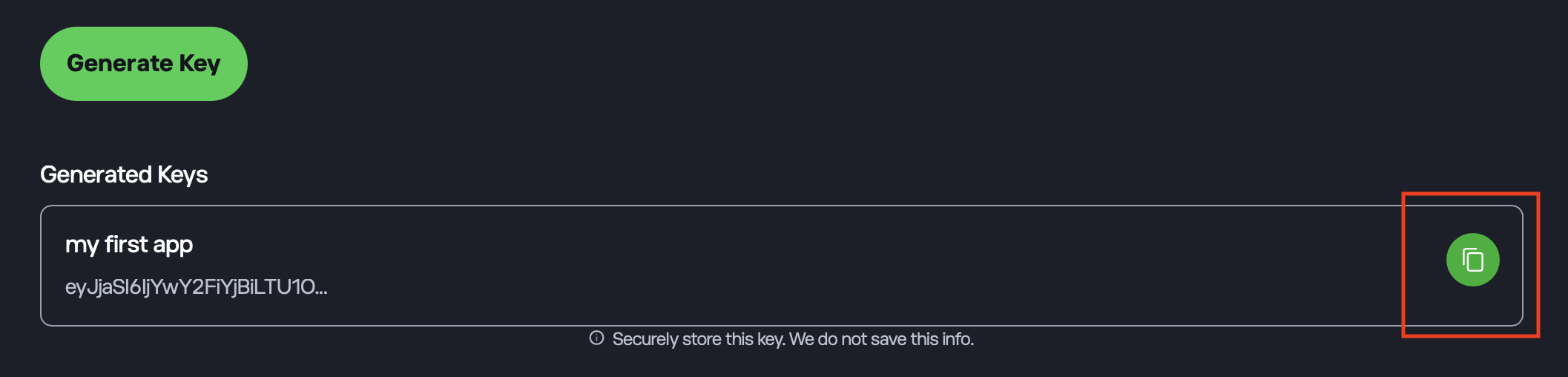
Once verified, your new key (the ETORO\_USER\_KEY) will appear in the "Generated Keys" list at the bottom of the screen. Click the **Copy** icon on the right side of the key field to copy the string to your clipboard.
<img src="https://mintcdn.com/etoro-6fc30280/g0Mti1rBGaHVyfWd/images/api-reference/authentication-6.png?fit=max&auto=format&n=g0Mti1rBGaHVyfWd&q=85&s=e83c82c35bb20aa07cfae26efc49ac1d" alt="API Key Management > Copy Key" data-og-width="2114" width="2114" data-og-height="508" height="508" data-path="images/api-reference/authentication-6.png" data-optimize="true" data-opv="3" srcset="https://mintcdn.com/etoro-6fc30280/g0Mti1rBGaHVyfWd/images/api-reference/authentication-6.png?w=280&fit=max&auto=format&n=g0Mti1rBGaHVyfWd&q=85&s=08098bc4573537dd5e0f56ab3164f49c 280w, https://mintcdn.com/etoro-6fc30280/g0Mti1rBGaHVyfWd/images/api-reference/authentication-6.png?w=560&fit=max&auto=format&n=g0Mti1rBGaHVyfWd&q=85&s=f3eb86be728698d918da117204cff5a0 560w, https://mintcdn.com/etoro-6fc30280/g0Mti1rBGaHVyfWd/images/api-reference/authentication-6.png?w=840&fit=max&auto=format&n=g0Mti1rBGaHVyfWd&q=85&s=7af0b4b4b5e12d03c4165b267b4feaf0 840w, https://mintcdn.com/etoro-6fc30280/g0Mti1rBGaHVyfWd/images/api-reference/authentication-6.png?w=1100&fit=max&auto=format&n=g0Mti1rBGaHVyfWd&q=85&s=453d108a40da529877f16c588d7c87a8 1100w, https://mintcdn.com/etoro-6fc30280/g0Mti1rBGaHVyfWd/images/api-reference/authentication-6.png?w=1650&fit=max&auto=format&n=g0Mti1rBGaHVyfWd&q=85&s=55d985a458e5b59bdd8cf0d7cc4c1d5b 1650w, https://mintcdn.com/etoro-6fc30280/g0Mti1rBGaHVyfWd/images/api-reference/authentication-6.png?w=2500&fit=max&auto=format&n=g0Mti1rBGaHVyfWd&q=85&s=37c05558385115a9ef6941947bab6970 2500w" />

## Header Format

All requests must include the following headers:

* **x-request-id**: A unique UUID for the request.
* **x-api-key**: Your Public API Key.
* **x-user-key**: Your User Key.

## Example Request

```bash theme={null}
curl -X GET "https://public-api.etoro.com/api/v1/watchlists" \
  -H "x-request-id: <UUID>" \
  -H "x-api-key: <YOUR_PUBLIC_KEY>" \
  -H "x-user-key: <YOUR_USER_KEY>"
```
